Phone Numbers
International phone numbers
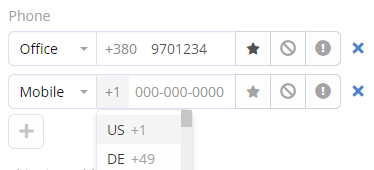
The international phone numbers functionality can be enabled or disabled at Administration > Settings. When enabled, all phone number values are stored in the international format, e.g. +111111111111.
Features:
- A user is able to select country code when entering a number in a phone number field.
- Appropriate formatting is applied when a phone number is displayed.
- Validation is applied when saving a phone number, not allowing to save a not valid number.
It is possible to define preferred country codes at Administration > Settings. This will avoid the need to enter the same country code when operating in a specific region.
When importing records, there is the ability to specify a regional telephone code, so that values in a regional format will be automatically converted to international. The same functionality exists for the Lead Capture feature.
Numberic search
Numeric search for phone numbers is enabled by default. It allows you to search for phone numbers using only digits, without dashes or the + sign.
Can be enabled or disabled with the parameter: Administration > Settings > General > Numeric phone number search.
Text filter and Global Search
Whether phone numbers are searched by the system in Text Filter or Global Search is controlled per entity type by the following parameter: Administration > Entity Manager > {Entity Type} > Edit > Text Filter Fields. The Phone Number field must be added to the list.
Search without country code
As of v10.0.8.
One can search by phone number without specifying a country code. This applies only to the preferred phone number country codes.
Applies for:
- Text search
- Global search
Applied if:
- International phone numbers enabled.
- Phone number numeric search is enabled.
- Phone field is added to the text filter list (in Entity Manager).